17
Unit C · Circuits and sensing
First blink
What we are making: a light on the board that turns itself on and off, over and over — and then we change how fast it does it.
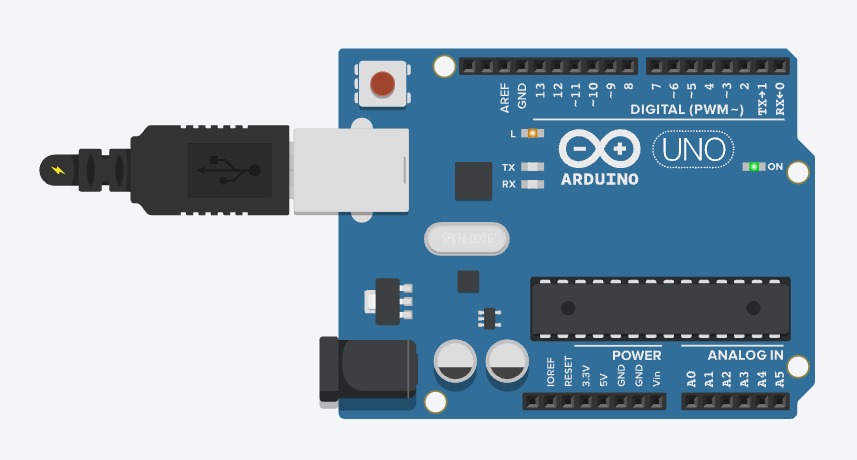
Photo: an Arduino board plugged in by USB with its small orange LED lit
Part 3 of 8
Wire it up
Nothing to wire. The board has its own small LED on pin 13, fitted at the factory.
1
Arduino board
1
USB cable
1
Computer with mBlock
- Plug the small end of the USB cable into the board and the big end into the computer.
- A green light comes on and stays on. That is the power light — it is not yours, and it is not the one we are going to blink.
- Open mBlock.
- Click Connect at the top, and choose your board from the list that appears.
🔧 If it goes wrong
If no board appears in the list, the most likely cause is the cable. Some USB cables are for charging only and have no data wires inside. Swap the cable before you change anything else.
Pins used13
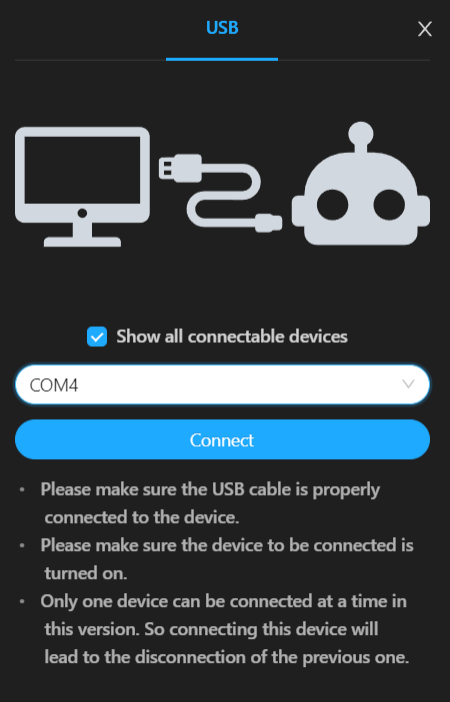
Screenshot: mBlock with the Connect dialog open, showing the board selected
Part 5 of 8
What each block is doing
- when the board starts up — everything below this runs the moment the board has power.
- forever — repeat everything inside me, without ever stopping.
- set pin 13 to HIGH — HIGH means on. Send electricity to pin 13. The LED lights.
- wait 1 seconds — do nothing at all for one second. Without this, the next instruction happens instantly and you would never see the light change.
- set pin 13 to LOW — LOW means off. Stop sending electricity. The LED goes dark.
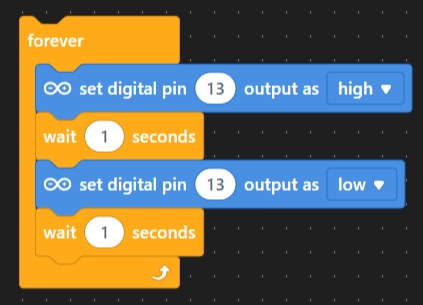
Screenshot: the finished blink program in mBlock, blocks assembled inside the forever loop
- Click Upload.
- Wait. A progress bar appears, and the board's lights flicker while the program transfers.
- Watch the small LED near pin 13.