Unit A · On the network
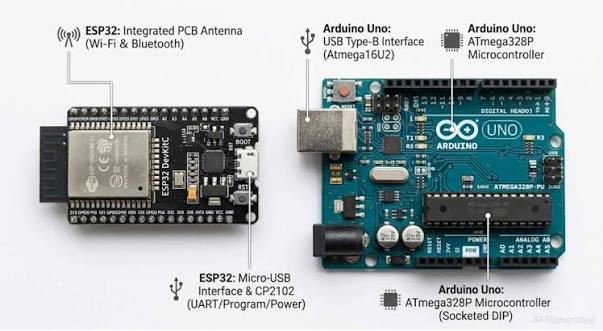
A new board
What we are making: nothing new — a blink. But on a board you have never used, through a toolchain that is not yet installed. That is the whole session, and it is not a waste of one.
The idea
Every professional project starts exactly like this: get the smallest possible thing running on the real hardware, before you write a line of the thing you actually care about. If you cannot blink an LED, nothing you write afterwards will tell you anything useful, because you will never know whether the problem is your code or your setup.
Install the board support
Once per computer. It takes a while and downloads a few hundred megabytes, so start it and read on while it runs.
- Open the Arduino IDE. Go to File → Preferences.
- In Additional Board Manager URLs, paste the ESP32 URL your teacher gives you. Click OK.
- Go to Tools → Board → Boards Manager. Search esp32.
- Install esp32 by Espressif Systems. Wait. It really does take that long.
- Now Tools → Board → ESP32 Arduino → ESP32 Dev Module.
- Plug the board in. Tools → Port — pick the one that appeared when you plugged it in.
The code
Familiar, with one difference: the pin number.
- Line 1 —
const intmeans a number with a name that never changes. Better than typing 2 everywhere. - Line 4 — 115200, not 9600. The ESP32 talks faster. If your serial monitor is set to 9600 you get unreadable rubbish, and it looks like the board is broken.
- Line 6 — print something in setup(). Now you can always tell a fresh boot from a frozen board.
Try it
Press upload. Watch the output window. On many ESP32 boards you will see
Connecting........ and then it goes.
Connecting........_____ and fails: hold down the BOOT button on the board, press upload, and keep holding until you see 'Writing at'. Some boards need this every single time. It is normal and it is not your fault.What breaks it
Three things, and you will meet all three today or in Session 2.
| What you see | Why | What to do |
|---|---|---|
| Unreadable characters in the monitor | Baud mismatch. | Set the monitor dropdown to 115200. |
| Connecting........ then timeout | Board not in boot mode, or bad cable. | Hold BOOT while uploading. Then try another cable. |
| Uploads fine, nothing blinks | Your board's LED is not on GPIO 2. | Try 2, then 5, then 16. Or wire an external LED with a 220Ω resistor. |
| Board resets over and over | Brown-out — not enough current from that USB port. | Use a different port, or a powered hub. Laptop front ports are often weak. |
What you learned
- Prove the toolchain before you build anything on it.
- The ESP32 is 3.3V and talks at 115200.
- A print in setup() tells you a boot happened. You will use that all year.
- 'It will not upload' is usually cable, port or boot button — rarely code.
- Find out how much memory the ESP32 has compared with the Uno. Write down both numbers.