What we are making: a machine that can tell how bright the room is —
and prints the answer on the screen as a number you can watch change.
Photo: breadboard with light sensor, a hand shading it, numbers changing on the laptop screen
The idea
The button was digital: two possible answers, pressed or not. Today's sensor is
analog: it gives back a number anywhere from 0 to 1023, depending on how much light
falls on it.
The sensor itself is a light-dependent resistor. In bright light electricity flows
through it easily. In the dark it resists, and less gets through. The board measures how much
arrives and turns that into a number.
Why there is a second resistor again
The board cannot measure resistance directly — only voltage. Pairing the sensor with a
fixed 10kΩ resistor turns "how much does it resist?" into "how much voltage arrives?",
which the board can read. The pair is called a voltage divider. You do not need
to understand the maths this year. You do need to wire it.
New words
DigitalTwo possible values: on or off.
AnalogA whole range of values, not just two.
A0A special pin that can measure a range, not just on and off.
Serial monitorA window on the computer that shows numbers the board sends back.
Wire it up
1
Breadboard
1
Light sensor
1
Resistor 10kΩ
3
Jumper wires
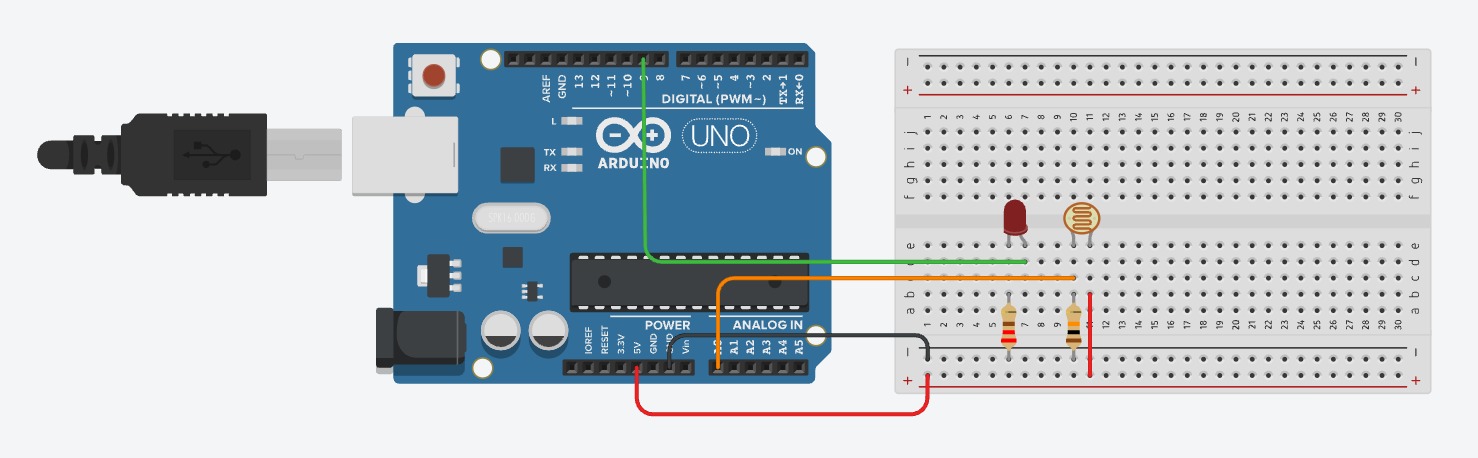
The sensor and the 10kΩ resistor share column 12. The green wire reads from that same column.
Push the light sensor into e8 and e12. It has no positive or negative side, so either way round is fine.
Push the 10kΩ resistor into b12 and b17.
Run a red wire from 5V to c8.
Run a green wire from d12 to pin A0. This is the important one — it reads the point between the sensor and the resistor.
Run a black wire from c17 to GND.
⚠ Careful
The green wire must be in the same column as both the sensor leg and the resistor leg (column 12). If it is anywhere else you will read either a constant 1023 or a constant 0.
Pins usedA05VGND
The code
No LED today. The whole job is to get a number out of the board and onto the screen.
Your program
when the board starts up
forever
print (read analog pin (A0))
wait (0.2) seconds
read analog pin A0 — take one measurement right now. Gives a number from 0 to 1023.
print — send that number up the USB cable to the computer.
wait 0.2 seconds — slow it down. Without this it prints hundreds of numbers a second and they scroll past far too fast to read.
Upload the program.
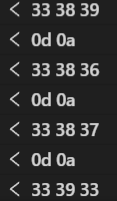
Open the serial monitor — the small window that shows what the board is sending back.
Watch the numbers.
Screenshot: mBlock with the serial monitor open, a column of light readings scrolling
Try it — and write the numbers down
Now measure three situations. You will need these exact numbers next week, so put them
somewhere you will not lose.
Normal room light. Hands off. Let it settle.
Hand covering it. Cup your hand right over the sensor.
Bright light. A phone torch straight at it.
🔮 Try this
Compare with the team next to you. Their numbers will be different from yours — maybe very different. Neither of you is wrong. A team by the window is genuinely in a brighter room than a team in the corner, and the sensor is telling the truth about where it is. This is exactly why you cannot use somebody else's number.
If it goes wrong
What you see
Why
What to do
Always reads 1023, whatever you do
The green wire is on the 5V side of the sensor instead of between the two parts.
Move it to the column the sensor and the resistor share.
Always reads 0
The green wire is on the GND side, or the 5V wire is missing.
Check the red wire is in the sensor's other column.
Numbers jump around wildly
A leg is loose, or the resistor is in the wrong column.
Press everything down. Check the 10kΩ really is 10kΩ and not 220Ω.
Serial monitor is empty
It is not open, or it is set to the wrong speed.
Open it from the toolbar. If it shows nonsense characters, the speed setting is wrong.
What you learned
Analog sensors give a range of numbers, not just on and off.
A voltage divider turns a changing resistance into something the board can measure.
The serial monitor lets you see what the board is thinking.
Readings depend on where you are. Your numbers are yours.
Challenge optional — only if you finish early
Find the exact light reading where your room stops being 'bright'. Write the number down.
Cover the sensor slowly and see whether the number changes smoothly or jumps.